
I remember sitting on my dad’s oil-stained concrete floor when I was ten, staring at a dead battery and feeling like I’d failed some invisible test. He didn’t hand me a manual; he just handed me a pair of gloves and told me to watch the sparks. Most people think you need some high-tech, $300 smart unit with a touchscreen just to get a car cranking again, but that’s a total scam. Real battery charger usage isn’t about fancy interfaces or expensive branding; it’s about understanding how much juice your cells can actually take without cooking the internals.
I’m not here to sell you on some overpriced gadget or give you a lecture filled with textbook jargon that doesn’t matter when you’re stuck in a driveway. My goal is to give you the straight truth based on what I see every single day at the shop. I’ll show you how to handle your charger so you can stop overpaying mechanics for things you can do yourself. We’re going to keep this simple and effective, focusing on the actual mechanics of the job so you can get back on the road with zero guesswork.
Table of Contents
- Smart Charger Technology vs Old School Methods
- Mastering Charging Voltage Requirements Without a Degree
- 5 Pro Tips to Keep Your Battery Alive (And Your Wallet Full)
- The Bottom Line: Don't Overthink It
- ## The Real Cost of Cutting Corners
- Don't Let a Dead Battery Hold You Hostage
- Frequently Asked Questions
Smart Charger Technology vs Old School Methods

Look, I’ve seen plenty of guys try to save a buck by using those old-school, “dumb” chargers they found in their grandad’s garage. Those things are basically just constant streams of electricity that don’t know when to quit. The problem is, they just keep pushing juice into the cells until things get hot and messy. If you’re dealing with standard lead acid battery care, those old units are a recipe for disaster because they lack any real way of preventing battery sulfation or sensing when the job is actually done.
That’s where smart charger technology changes the game. Instead of just blasting power, a smart unit actually talks to your battery. It monitors the charging voltage requirements in real-time and tapers off the current as the battery nears a full charge. It’s a huge deal for overcharging prevention tips because it stops the battery from boiling its own electrolyte away. Whether you’re maintaining a daily driver or doing some deep cycle battery charging on a project rig, you want a device that knows when to back off. It’s about working smarter, not harder.
Mastering Charging Voltage Requirements Without a Degree

Look, you don’t need to sit through a lecture on electrical engineering to get this right. Most people think if you just hook it up, the job is done, but if you aren’t paying attention to your charging voltage requirements, you’re asking for trouble. If you’re working with a standard car battery, you’re looking at a 12-volt system, but the actual voltage during the charge cycle is what matters. If you push too much juice into a battery that isn’t ready for it, you’re basically cooking the internals.
It gets a bit more technical if you’re dealing with specialized setups, like deep cycle battery charging for your boat or RV. These batteries are built differently and need a more controlled approach to avoid damage. My biggest piece of advice? Keep an eye on the heat. If the battery feels hot to the touch, something is wrong. Following basic lead acid battery care—like ensuring the charger isn’t constantly pushing high voltage once the battery is full—is the easiest way to stop preventing battery sulfation from becoming a massive, expensive headache down the road.
5 Pro Tips to Keep Your Battery Alive (And Your Wallet Full)
- Don’t just slap the clamps on and walk away. Always connect the red positive terminal first, then the black negative, and make sure they’re actually biting into the metal. If you’ve got corrosion—that white crusty stuff—clean it off with a wire brush first, or you’re just wasting your time.
- Stop using those cheap, old-school “dumb” chargers if you can help it. They just pump juice until the battery is cooked. Grab a smart charger that has a “float” or “maintenance” mode. It’ll trickle the power in and then back off once it’s full, so you don’t boil the acid inside.
- Watch your environment. I’ve seen guys try to charge a battery in a freezing garage or under direct sunlight. If it’s too cold, the chemical reaction slows down; if it’s too hot, you risk a vent explosion. Keep it in a dry, temp-controlled spot if you want it to last.
- Check your connections every twenty minutes or so. I know it sounds extra, but I’ve seen clamps slip off and spark against a frame, and that’s a quick way to turn a simple charge into a fire hazard. Make sure they’re tight and won’t budge if you give ’em a little tug.
- If your battery is totally dead—like, zero volts on a multimeter—don’t expect a smart charger to even recognize it. Most modern chargers won’t start if they don’t “see” a battery. In that case, you might need to jump-start it briefly just to give the charger enough juice to wake up and take over.
The Bottom Line: Don't Overthink It
Stop treating your battery like an old lead weight; use a smart charger that handles the heavy lifting so you don’t accidentally cook your electronics.
Get comfortable with the numbers—knowing the difference between a trickle charge and a fast charge is the easiest way to avoid a dead battery or a fried cell.
You don’t need a shop full of expensive gear, just make sure you’ve got the right voltage settings for your specific car so you aren’t guessing under the hood.
## The Real Cost of Cutting Corners
“Look, you can save a few bucks by using some ancient, ‘dumb’ charger you found in your uncle’s garage, but if you’re not careful, you’re just cooking your battery cells instead of actually fixing them. A little bit of smart tech is cheaper than buying a brand new battery every six months.”
Nikolai·Osterman
Don't Let a Dead Battery Hold You Hostage
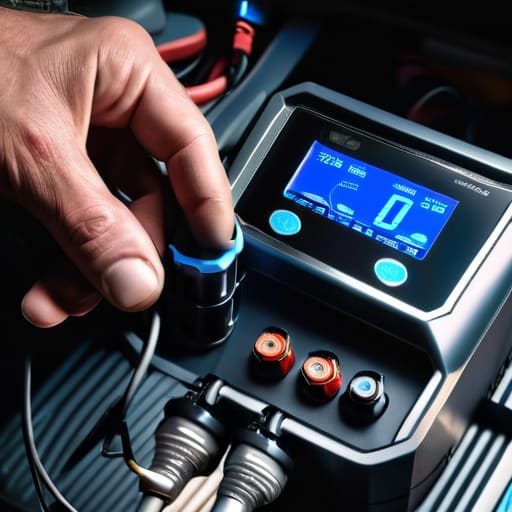
At the end of the day, getting your battery back in shape isn’t some dark art reserved for master techs. We’ve covered how to tell the difference between a smart charger that does the thinking for you and those old-school bricks, and more importantly, how to match your voltage so you don’t accidentally fry your car’s sensitive electronics. Just remember: read the manual once, grab your tools, and pay attention to what the charger is telling you. If you can handle a basic diagnostic, you can definitely handle a charging cycle without breaking anything important.
Look, I know it can feel intimidating when you’re staring at a mess of wires and blinking lights, but don’t let that stop you. Every time you tackle a job like this yourself, you’re one step closer to being the person who actually understands their machine instead of just being another customer getting overcharged at a shop. It’s about taking control of what you drive. So, grab that magnetic tray, keep your head down, and just keep turning wrenches. You’ve got this, and your wallet will definitely thank you in the long run.
Frequently Asked Questions
Is it actually safe to leave a smart charger hooked up to my car overnight while I'm sleeping?
Look, I get why you’re nervous—nobody wants to wake up to a smoking engine bay. But if you’re using a legit smart charger, you’re good. These things are designed to sense when the battery is topped off and automatically switch to a “float” or maintenance mode. It basically stops pulling juice once it’s full. Just make sure your connections are tight and you aren’t using some cheap, unbranded junk from a random site.
How do I know if my battery is actually dead or if the charger itself is just busted?
Look, I’ve been there—staring at a dead car wondering if I need a new charger or a new battery. Here’s the trick: grab a multimeter. If your charger is putting out voltage at the clamps but the battery stays at zero, the battery’s likely toast. If the charger isn’t showing any output at all even when plugged in, the charger’s the problem. Don’t just guess and waste money; check the juice first.
Can using a cheap charger from a big-box store eventually mess up my car's sensitive electronics?
Look, I’ve seen this happen way too often. Those super cheap, “dumb” chargers from the big-box stores don’t have any brains; they just shove current into the battery until it’s full. The problem is, they don’t know when to stop, and that voltage spike can absolutely fry your ECU or sensitive sensors. If you’re driving something modern with a ton of electronics, don’t cheap out. Get a smart charger that actually talks to the battery.
